Google Sheets Planner Template: 8 Tabs Worth Copying, With the Tabs of a 70+ Tab File
A Google Sheets planner template is only useful if its tabs feed each other. See 8 tabs worth copying, how they link, and a real 70+ tab Sheets and Excel file.
By Ultimate Life Organizer by Cosmo Suite · Editorial policy
Published · 8 min read
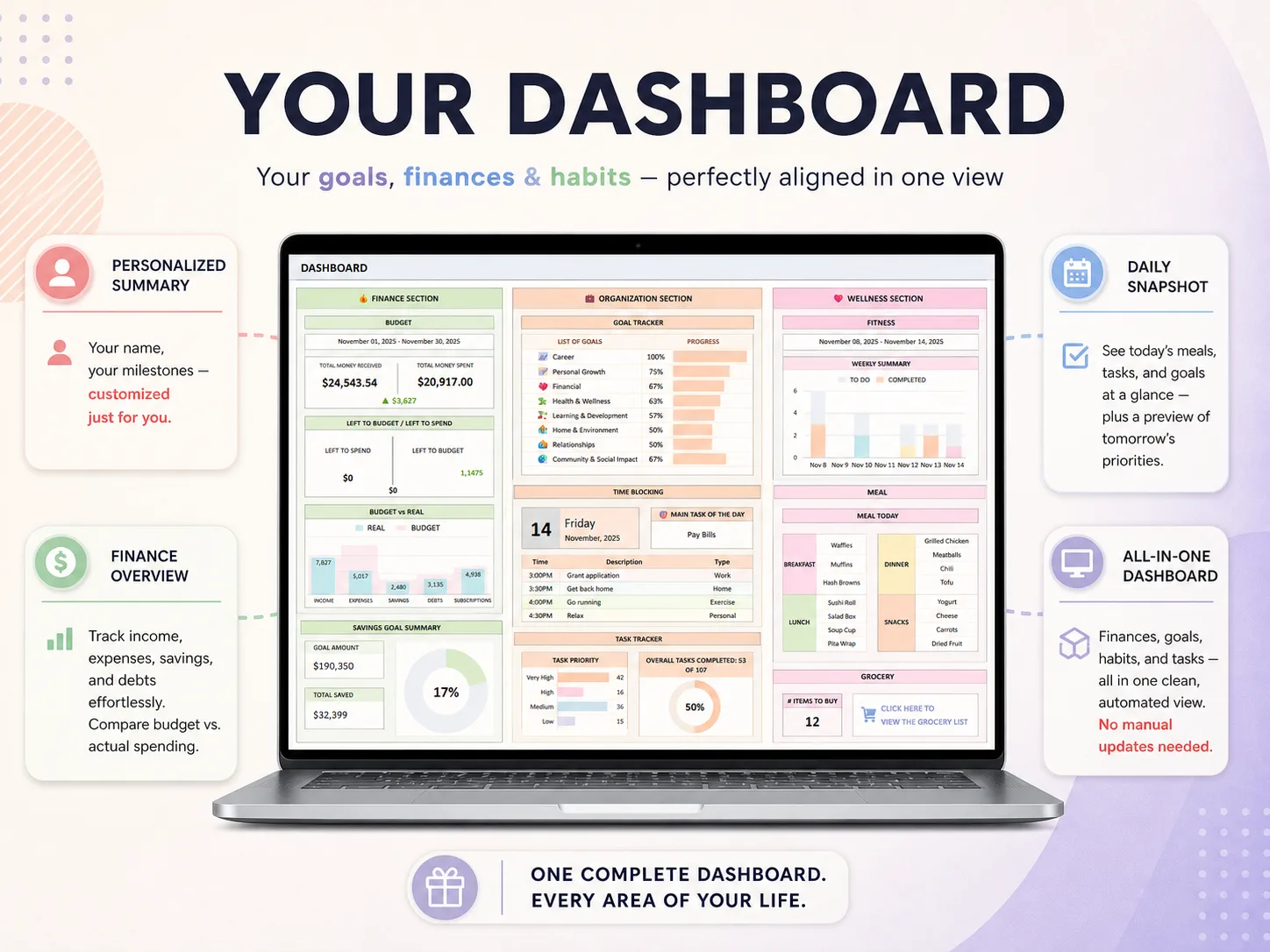
A Google Sheets planner template is worth copying only if its tabs feed each other. A weekly schedule on one tab and a budget on another is simply two separate lists, whereas a dashboard that updates the moment you log a bill is a planner.
The short answer: look for eight tabs (dashboard, monthly calendar, weekly view, tasks, budget, habits, goals, meals) and check that an entry in one of them shows up in the others. Below is what each tab does, why the free galleries mostly stop at one tab, and what a real 70+ tab Sheets and Excel file looks like when you open it.
Key takeaways
- Free galleries give you single-purpose tabs. A planner needs tabs that read from one another.
- Eight tabs cover most life admin: dashboard, monthly calendar, weekly view, tasks, budget, habits, goals and meals.
- The test of a template is simple: enter one bill once and see whether the calendar and the budget both pick it up.
Google Sheets Planner Template Tabs at a Glance
This table lists the eight tabs, what each one answers, and what it should read from. Use it as a checklist when you compare any template, free or paid.
| Tab | Question it answers | Should read from |
|---|---|---|
| Dashboard | How am I doing this month? | Budget, habits, goals, tasks |
| Monthly calendar | What is on this month? | Recurring bills, income, events |
| Weekly view | What do I do this week? | Calendar, task list |
| Task list | What is open, due or done? | Entered once, shown on the dashboard |
| Budget | Am I on plan? | Transaction log |
| Habit tracker | Did I do the small things? | Daily ticks |
| Goals | How far along am I? | Dated steps |
| Meal plan and groceries | What is for dinner, what do I buy? | Weekly meal plan |
Habit and task tabs can stay simple, but the budget and the calendar are where linking pays off, because those are the two places where you would otherwise retype the same fact.
What Do Free Google Sheets Planner Templates Usually Give You?
Free galleries hand you one tab per job, which is fine for one job and awkward for a life. We opened the two pages that rank at the top of Google for this search on 13 October 2026.
- Zapier lists 21 free Google Sheets templates (updated August 2025). They are mostly business forms: invoice, expense report, payroll, Gantt chart, inventory. A to-do list, a time-blocking sheet and a habit tracker are in there, each as a separate file.
- Smartsheet offers eight weekly schedule templates (published 28 June 2023): basic, work, student, construction, project, employee, task and planner. Each is a schedule grid, and the page also points toward Smartsheet's own scheduling product.
Both are useful when you need a schedule or an invoice, but neither is built to hold your bills, tasks, habits, meals and goals in one connected file. Copy five of them and you have five separate files to keep current, which is exactly the problem most people are trying to leave behind.
Google Sheets itself costs nothing with a Google Account (Google Workspace FAQ), so the cost of a planner is your time, not the software. Sharing is built in too. Google's help pages describe viewer, commenter and editor roles set per file, and a collaboration guide for Sheets with comments and version history. That makes a shared household planner easy, as long as you put private tabs in a separate file.
What Should a Google Sheets Planner Template Track?
Life admin is a daily load, not an occasional chore. On an average day, 81% of people did household activities, according to the Bureau of Labor Statistics' American Time Use Survey for 2025. A planner you have to babysit loses to that load, so the template needs to be quick to update. For example, a sheet that asks you to retype rent every month will be dropped by spring.
A planner template is a spreadsheet with ready-made tabs for your calendar, money, tasks, habits and goals. A linked template is one where entries on one tab appear on the others, so you type each fact once.
Here is what each of the eight tabs should do, and the part of it worth copying.
1. Dashboard
A dashboard is one screen that shows this month's income, expenses, savings, today's tasks and goal progress. It reads from the other tabs and takes no typing of its own, because a dashboard you have to update by hand is really a poster.
2. Monthly calendar
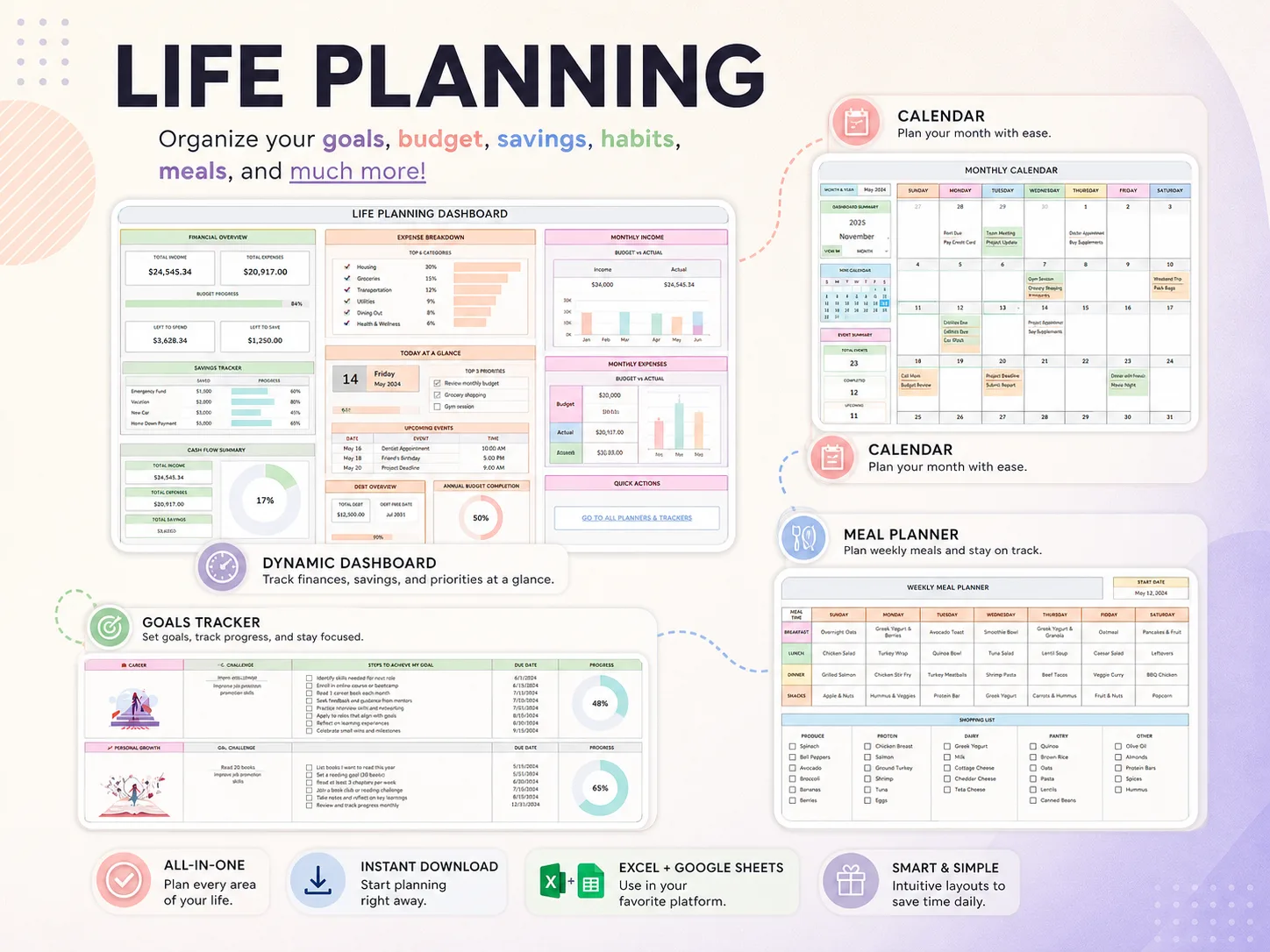
A monthly calendar is a month grid that shows bills, paychecks and events on their dates. The useful version fills itself from a list of recurring items, so rent appears on the first of every month without you entering it twelve times.
3. Weekly view
The week ahead, with tasks and dinners next to each other. Keep it short, because its job is the Sunday 20-minute session in which you check what is due, what is for dinner and what is on the calendar.
4. Task list
A log with a due date, a category and a status, plus a view of what is open and overdue. Recurring chores belong in their own log, so that they do not clutter the one-off tasks you actually need to see.
5. Budget
A budget vs actual view is a side-by-side of what you planned to spend and what you spent in each category, fed by a transaction log. This is the tab people most often try to build themselves and abandon, because the formulas have to be correct before anything is useful.
6. Habit tracker
A grid of days and habits, with a percent complete per habit. Keep the list short, five to eight habits, because a long list is one more thing to update.
7. Goals
Each goal broken into dated steps with a progress bar. A goal with no steps and dates stays a wish. A meta-analysis by Gollwitzer and Sheeran found that plans naming when and where you will act had a medium-to-large effect on reaching goals (d = .65, 94 tests). A template that gives you the dated step rows saves the hardest bit of planning.
8. Meals and groceries
A weekly grid from breakfast to snacks, with a shopping list underneath. If the list is built from the plan, you shop once from one place.
How Do the Tabs Link in a Real Template?
A good template is judged by one test: enter something once and see where it shows up. Here is that test on the Ultimate Life Organizer, a ready-made file for Excel and Google Sheets.
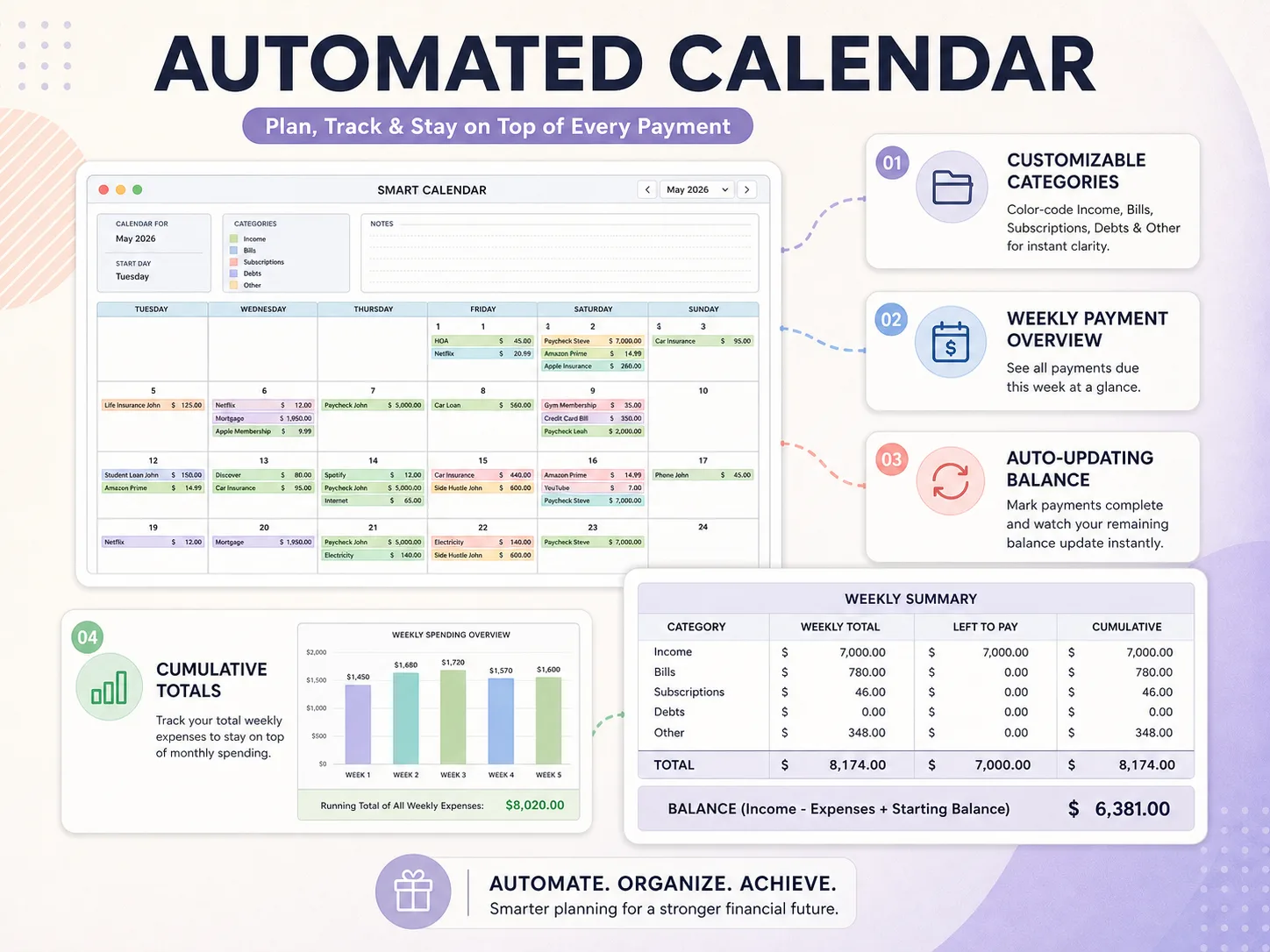
You enter rent, a phone bill and a streaming subscription once, as recurring automations with a chosen frequency (the file offers 7 of them), and from that point onward the following happens:
- The automated calendar shows each payment on its due date, color-coded by income, bills, subscriptions and debts, so nothing depends on your memory.
- A weekly summary adds up what is due and what is still left to pay during that week.
- When you mark a payment as paid, the remaining balance updates automatically.
- The budget tabs compare planned and actual spending by category over the whole year.
You typed three lines and four places updated. That is the difference between a linked template and a pile of tabs, and it is the reason a file with many tabs can still take only a short time to maintain.
What Is Inside a 70+ Tab Google Sheets Planner?
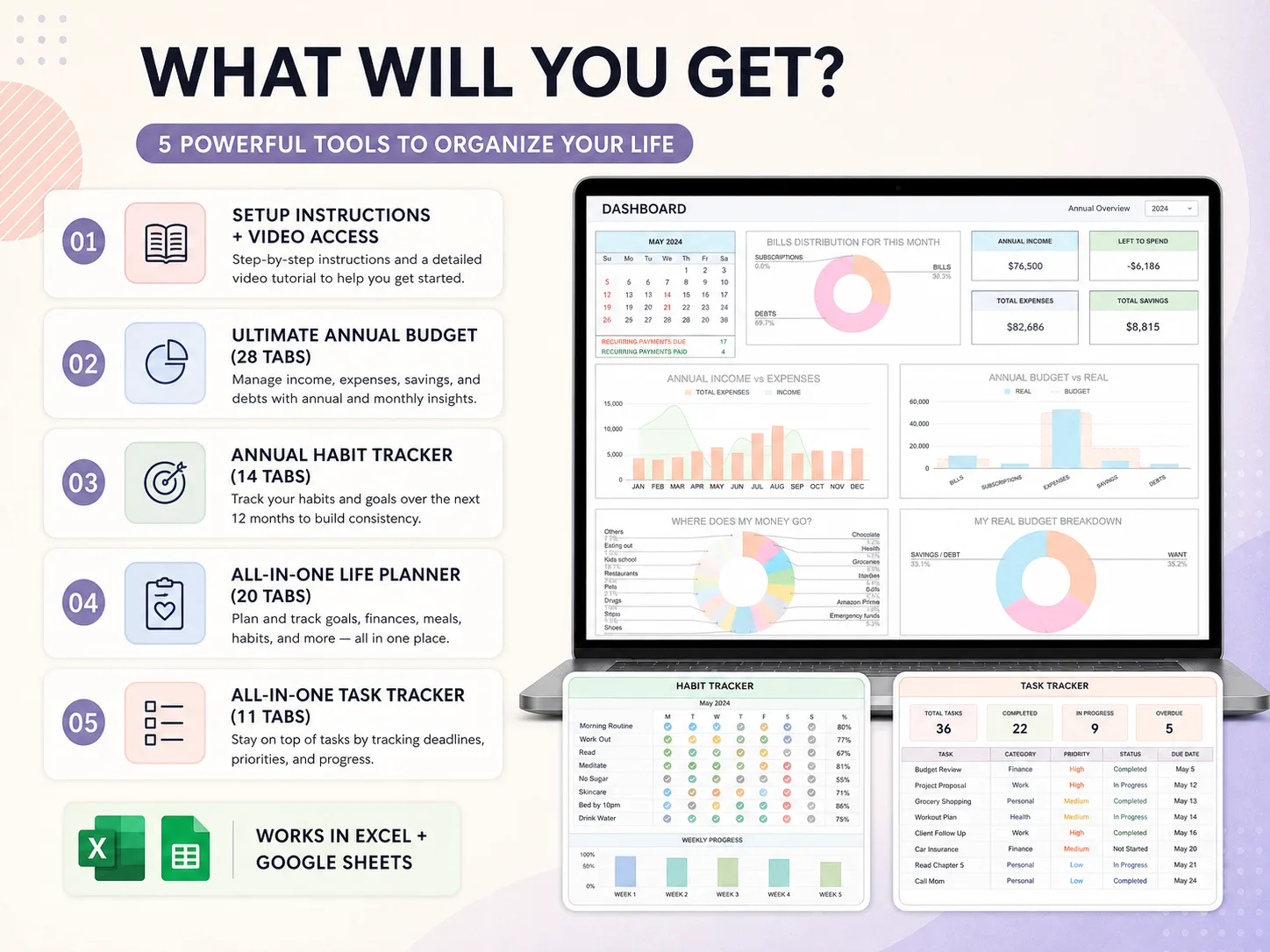
The Ultimate Life Organizer is four spreadsheets in one download, with more than 70 tabs between them, and each one is a set of the tabs above. We sell it, so weigh this section with that in mind.
| Spreadsheet | Tabs | What it covers |
|---|---|---|
| Ultimate Annual Budget | 28 | Income, expenses, savings and debts, with annual and monthly views |
| Annual Habit Tracker | 14 | Habits and goals over 12 months |
| All-in-One Life Planner | 20 | Dashboard, goals, calendar, finance, fitness, meals and more |
| All-in-One Task Tracker | 11 | Tasks, deadlines, priorities and progress |
A step-by-step video tutorial and setup instructions come with it. The file works in Excel and in Google Sheets, so you can pick whichever you already use.
For a wider comparison with paper planners, apps and Notion, see our guide to which life planner format actually gets used and the list of best life planners with three-year costs.
Should You Build Your Own Google Sheets Planner or Copy One?
Build your own if you enjoy spreadsheets and have a free weekend, since Google Sheets is free with a Google Account. Copy a ready-made one if you want the result more than the project. Both approaches work, and neither one sends reminders.
- Build: costs $0 and teaches you the formulas, but the risk is that the first weeks disappear into layout work, and the planner is not useful until every formula works.
- Copy a free template: good for one job such as a weekly schedule, although you should expect to link the tabs together yourself afterwards.
- Buy a linked file: costs money once and skips the build entirely, while you still spend an evening entering your own bills, habits and goals.
If you build, start with the budget and the calendar, add one tab each week, and run the same test on every addition by entering a fact once and checking where it appears.
Why Trust This Article
We are the Cosmo Suite team that builds and sells the Ultimate Life Organizer, so we have a stake in this topic. Where a free template or a self-built sheet fits better, we say so.
Methodology: we opened the Zapier and Smartsheet pages on 13 October 2026 and described as they appeared that day. The tab list and screenshots are from our own file, with sample data. Read more about us and how we write in our editorial policy, or contact us through the site footer if you spot a page that has changed.
Where the Ultimate Life Organizer Fits
The Ultimate Life Organizer, sold by Cosmo Suite at ultimatelifeplanner.site, is the ready-made option in this guide, built for Excel and Google Sheets.
It has four spreadsheets and 70+ tabs: a Budget Planner, an Annual Habit Tracker, a Life Planner and a Task Tracker. The all-in-one dashboard combines finance, organization and wellness sections. Monthly and weekly calendars fill themselves in, and a goal tracker shows progress bars. Recurring automations handle income, bills, debts and subscriptions at 7 frequencies. You also get 12 monthly habit trackers, fitness, weight and hydration trackers in metric or imperial, a weekly meal planner with a grocery list, and a task dashboard.
It costs $9 once, has no subscription, and you can reuse it every year. It does not send reminders, so keep a phone alert for that one job. See the tabs of the Google Sheets and Excel planner template before you decide.
Frequently asked questions
Is there a free Google Sheets planner template?
Yes. Google Sheets is free with a Google Account, and many sites offer free planner and schedule templates you can copy. Free templates are usually one tab, such as a weekly schedule. A planner that also covers budget, habits and goals needs several connected tabs, which you either build or buy ready-made.
What tabs should a Google Sheets planner template have?
At minimum: a dashboard, a monthly calendar, a weekly view, a task list, a budget with a transaction log, a habit tracker, a goals tab and a meal plan. The test is whether a change in one tab shows up in the others. Tabs that stand alone are just separate lists.
Can I use a Google Sheets planner template in Excel?
Usually yes, since Google Sheets opens and saves .xlsx files. Charts and some formulas may shift on conversion, so check the dashboard after you open it. The Ultimate Life Organizer ships Excel files and Google Sheets copies together, so you do not convert anything.
Does a Google Sheets planner send reminders?
No. A spreadsheet shows what is due when you open it, but it does not push notifications to your phone. If you need an alert at 8 a.m., pair the sheet with your phone's calendar or a reminder app for that one job.
How long does it take to set up a Google Sheets planner?
Building your own takes from a weekend to several weekends, because most of the time goes into layout and formulas. Filling in a ready-made template takes about an evening: recurring bills and income, a few habits and one or two goals. After that, a weekly review is short.
Can I share a Google Sheets planner with a partner?
Yes. Google Sheets lets you share a file and choose whether people can view, comment on or edit it. Decide up front which tabs are shared, such as groceries and the calendar, and which stay private, such as personal habits. Keep private tabs in a separate file, because sharing applies to the whole file.
Sources
- U.S. Bureau of Labor Statistics: American Time Use Survey, 2025 results
- Gollwitzer and Sheeran (2006): Implementation intentions and goal achievement, a meta-analysis
- Google Docs Editors Help: Share files from Google Drive (viewer, commenter, editor, owner)
- Google Docs Editors Help: Collaborate in Sheets
- Zapier: 21 free Google Sheets templates to boost productivity (updated Aug 2025)
- Smartsheet: Free Google Sheets weekly schedule templates (published 28 Jun 2023)
- Google Workspace: FAQ (free consumer apps)
