Life Planners That Actually Get Used (Matched to How Many Apps You Juggle)
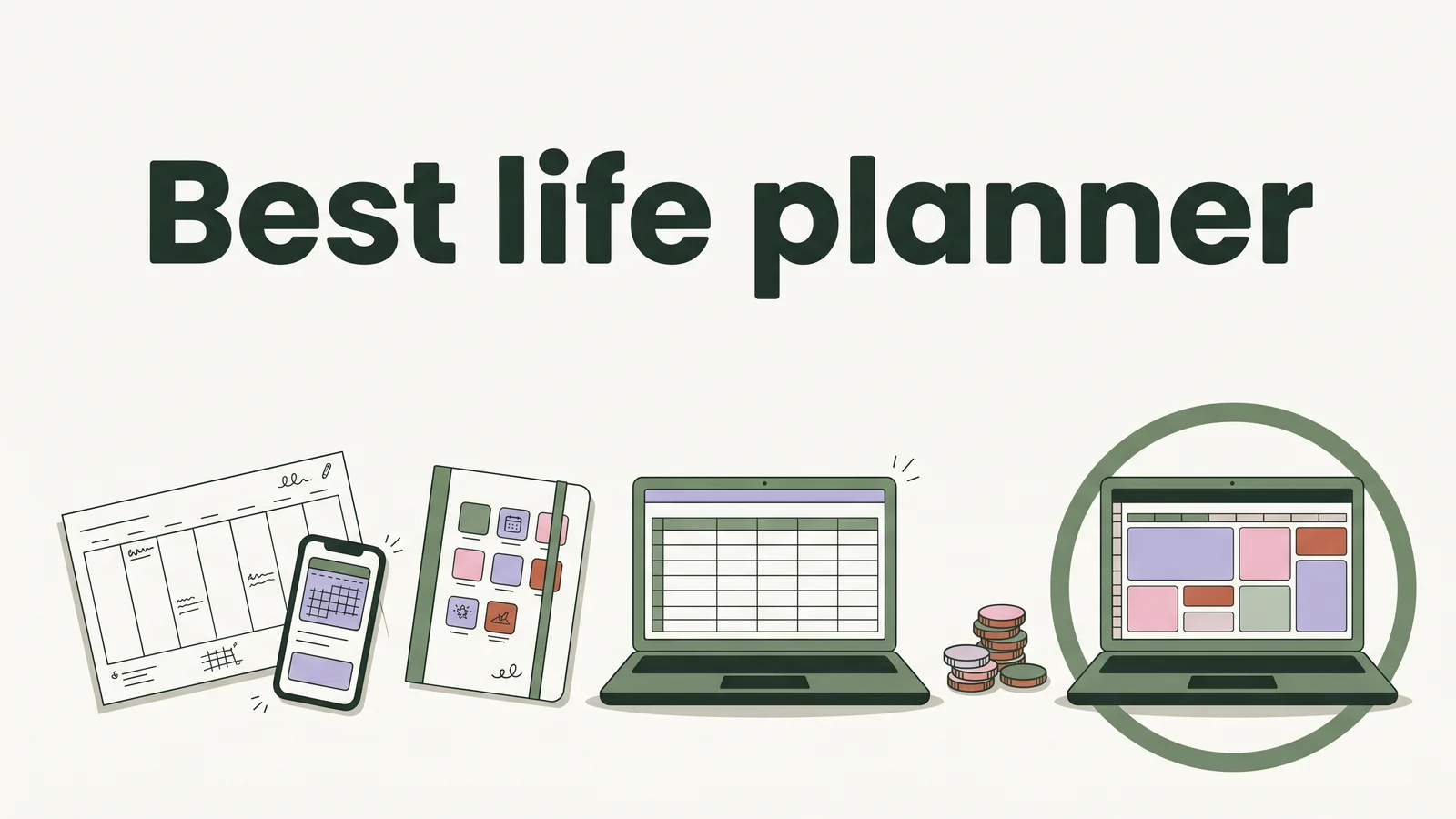
Life planner options compared: paper, separate apps, Notion and a spreadsheet, with what each costs over three years and which one you'll keep opening.
By Ultimate Life Organizer by Cosmo Suite · Editorial policy
Published · 9 min read
When a life planner stops getting opened, it is usually for one of three reasons. The planner covers only part of your life, so money and meals still live somewhere else. Updating it means copying what you already wrote in another app. Or a busy week breaks the routine, and the gap makes it feel pointless to restart.
The short answer: pick the life planner with the fewest places you have to update. For some people that is a paper notebook. For people already juggling a budget app, a to-do app, a calendar and a meal app, it is usually one connected file, such as a life planner spreadsheet that keeps money, tasks, meals and goals in one place.
Keeping a planner going is a setup problem before it is a discipline problem. Below are the four formats, what each costs over three years, and the setup that keeps one in use.
Key takeaways
- Count the places your life admin lives today. Every extra place is something to keep in sync.
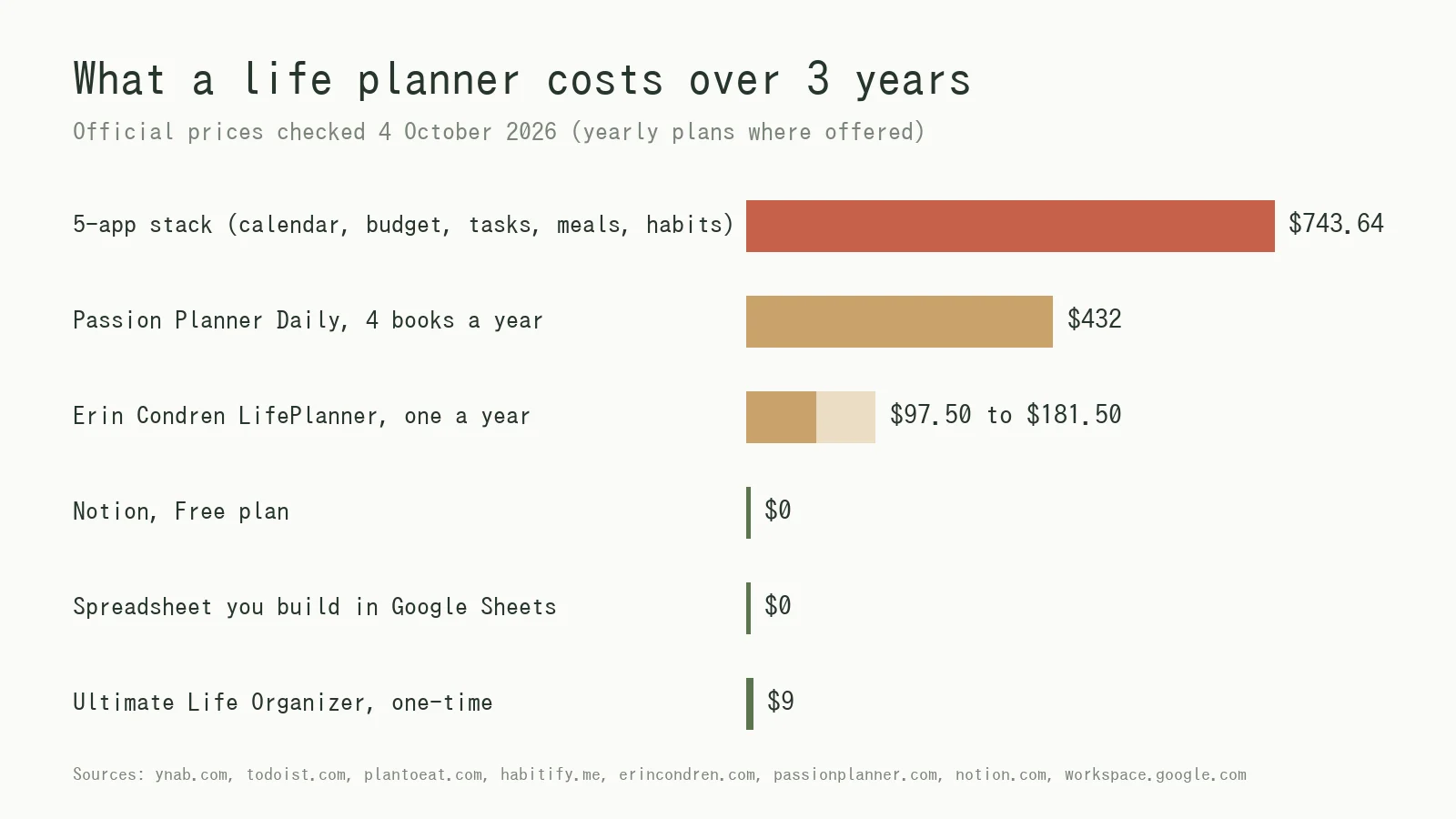
- Over three years, an example stack of four paid apps costs about $744, a paper planner $97.50 to $432 depending on brand and layout, and a spreadsheet you own $0 to $9.
- A planner survives when one entry (rent, a goal, a week of dinners) updates every view that needs it.
Life Planners at a Glance
A life planner can be a paper book, a set of apps, a Notion template or a spreadsheet. Which one is right depends on how many separate places you are willing to keep up to date. With one or two, paper or apps hold up; at three or more, one file is usually easier to keep current.
| Format | What it holds | Cost (checked 4 Oct 2026) | Upkeep | Best for |
|---|---|---|---|---|
| Paper planner | Calendar, to-dos, notes, some goal pages | $32.50 to $60.50 a year for most Erin Condren designs; $144 a year for Passion Planner Daily (four $36 books) | Rewrite recurring items by hand | People who think by writing |
| Separate apps | One job per app: calendar, budget, tasks, meals, habits | About $248 a year for four paid apps | Update each app; nothing adds up across them | Phone reminders, shared family schedules |
| Notion template | Pages and databases you arrange yourself | Free plan available | Build and maintain the setup | People who enjoy building their system |
| Spreadsheet life planner | Budget, calendar, tasks, habits, meals and goals in linked tabs | $0 to build, or a one-time file | Enter each item once; totals and charts fill in | Anyone juggling several apps who wants one place |
What Should a Life Planner Track?
A life planner should track the parts of running your life that you check every week: money, time and tasks, habits and health, meals, and goals. A calendar ties them together. A planner that covers only one of these pushes the rest into other apps.
A life planner is a single system, on paper or on a screen, that holds your calendar, money, habits, meals and goals together, so you can plan the week from one view instead of several.
Life admin takes time every day. In the Bureau of Labor Statistics' American Time Use Survey for 2025, 81% of people did household activities on an average day, and the average across everyone was about 2 hours a day (BLS, 2025 data). Household management, the paperwork side of it, averaged 0.17 hours a day across the whole population, about 10 minutes (ATUS Table 1).
What each area needs:
- Money: income, bills, subscriptions, debts and savings, with budget vs actual for the month.
- Time and tasks: a monthly and weekly calendar, a task list with priorities, and recurring chores.
- Habits and health: a few habits ticked daily, plus weight, workouts or water if you track them.
- Meals: a weekly plan from breakfast to snacks, and the grocery list that goes with it.
- Goals: one to three yearly goals, cut into steps with dates and a visible progress bar.
Why Do Most Life Planners Get Abandoned?
Most life planners get abandoned because keeping them current takes more steps than the planner saves. The more places one fact has to live, the sooner one of them goes stale, and a stale planner stops being trusted.
Take rent. In a stack of separate apps, rent can live in three places: a calendar reminder, a scheduled payment in the budget app, and a recurring to-do. In a dated paper planner, you write it 12 times a year and add it up by hand. In a connected spreadsheet, you enter it once as a monthly payment, and the calendar and the budget read from that one row.
Planning itself works. An implementation intention is a plan that names when and where you will act, such as "pay bills on Sunday at 7 p.m. at the kitchen table". A meta-analysis by Peter Gollwitzer and Paschal Sheeran found that implementation intentions had a medium-to-large effect on goal attainment (d = .65) across 94 independent tests. A plan only helps if you see it at the moment you need it, so where your planner lives matters as much as what is in it.
So the fix is to keep fewer copies of each thing. If you have quit a planner before, that usually says more about the setup than about you.
How Much Does a Life Planner Cost Per Year?
A life planner costs between nothing and about $250 a year, depending on the format.
Our price check: here is an example stack of five apps, priced on each vendor's own page on 4 October 2026, with the yearly plan where one exists.
| Job | Example tool | Price per year | Over 3 years |
|---|---|---|---|
| Calendar | Google Calendar | $0 (free with a Google Account) | $0 |
| Budget | YNAB | $109 | $327 |
| Tasks | Todoist Pro | $60 | $180 |
| Meals | Plan to Eat | $49 | $147 |
| Habits | Habitify | $29.88 ($2.49 a month, billed yearly) | $89.64 |
| Total | 5 apps | $247.88 | $743.64 |
Prices come from YNAB's pricing page, Todoist's help article on its Pro pricing (effective 10 December 2025), and the Plan to Eat and Habitify sites. Each app does its own job well, but none of them adds up across the others.
For comparison over the same three years:
- Paper: an Erin Condren LifePlanner started at $32.50 (A5 softbound), and most coiled designs were $60.50, so $97.50 to $181.50 if you buy one a year (a dated planner covers 12 months). A Passion Planner Daily (undated, small) was $36 a book, but each book holds 93 daily pages, about three months, so a year of daily planning takes four books: $144 a year, or $432 over three years.
- Notion: the Free plan costs nothing; you pay in setup time.
- Spreadsheet: Google Sheets is free with a Google Account. A ready-made file is a one-time cost, so year two and three cost nothing.
Paper, Apps, Notion or a Spreadsheet: Which Fits You?
The best format matches how you already work: paper for thinking in writing, apps for life on your phone, Notion for building, and a spreadsheet for one place that does the maths.
Paper planner: the best for thinking by hand
Paper has no battery, no notifications and no login. Some people find a plan sticks better once it is written by hand. The weak spots are repetition and maths: recurring bills get rewritten, budgets get added up by hand, and last year's goals end up in a drawer.
Best for: people who plan by writing and keep money elsewhere.
Separate apps: the best for reminders and sharing
Apps do what a file cannot: push a reminder at 8 a.m., sync a family calendar, and capture a task while you are in a queue.
Best for: households that share a live schedule or rely on phone alerts.
Notion template: the best for builders
Notion lets you design every page. That suits people who enjoy tinkering. For everyone else the system can stay half-built, and sums such as budget vs actual need formulas you set up yourself.
Best for: people who like building their own system.
Spreadsheet life planner: the best for one place
A spreadsheet adds things up on its own. Enter a bill or a habit once and the totals, charts and calendars follow. The trade-off is no push reminders and some typing on your phone.
Best for: anyone replacing three or more apps who wants to own one file.
What Does a Connected Life Planner Look Like in a Normal Week?
A connected life planner is one where a single entry shows up everywhere it matters. That way a normal week takes one short session instead of five app check-ins. Here is an illustrative week in the Ultimate Life Organizer from ultimatelifeplanner.site, Excel or Google Sheets, with sample numbers.
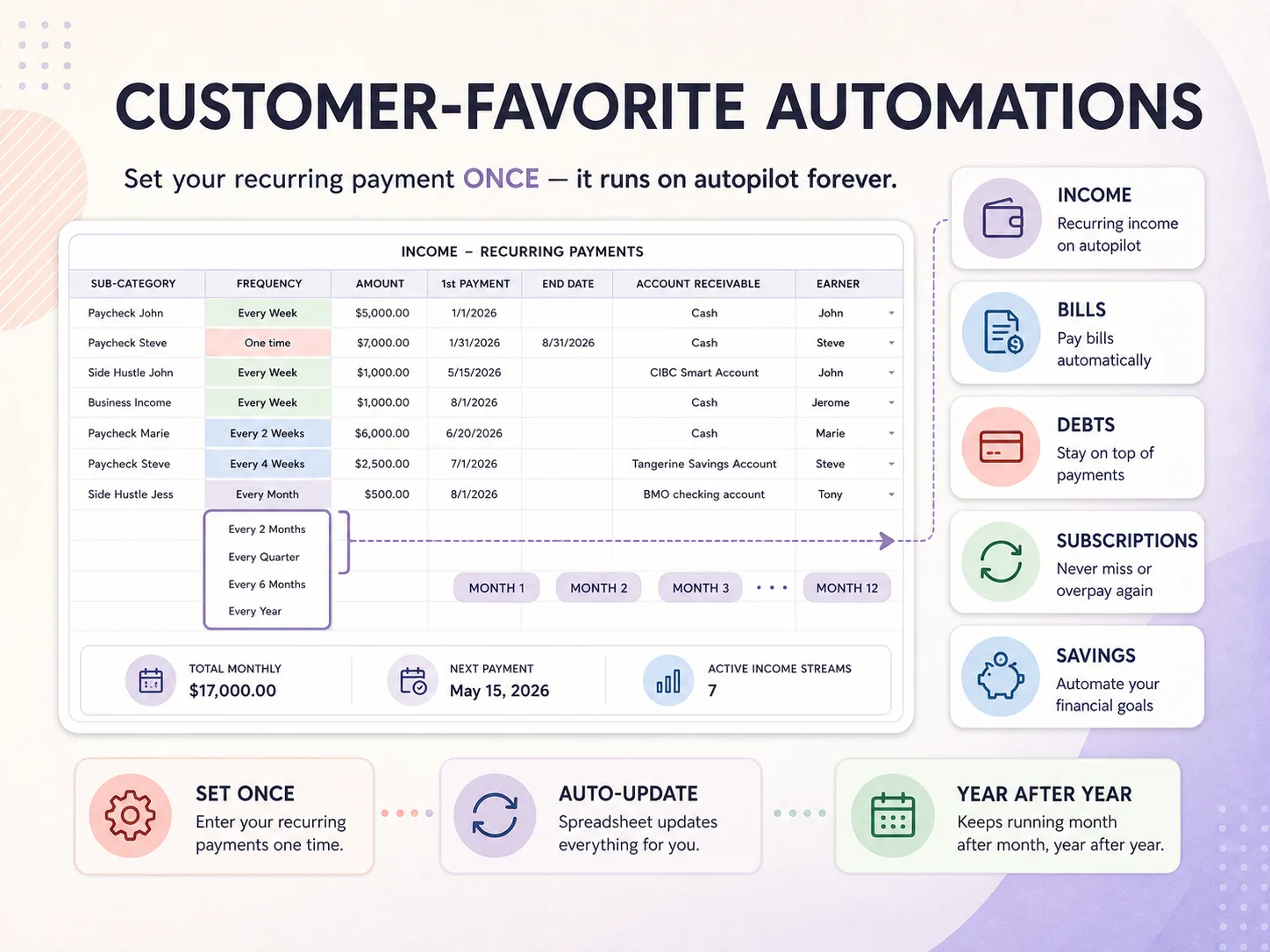
Set up once (first evening). Most of the work happens here. Rent of $1,400 goes in once as a recurring monthly payment from the 1st, and it then shows on the monthly calendar and in budget vs actual for all 12 months, $16,800 for the year. A paycheck, a phone bill and one streaming subscription go in the same way, each with its own frequency.
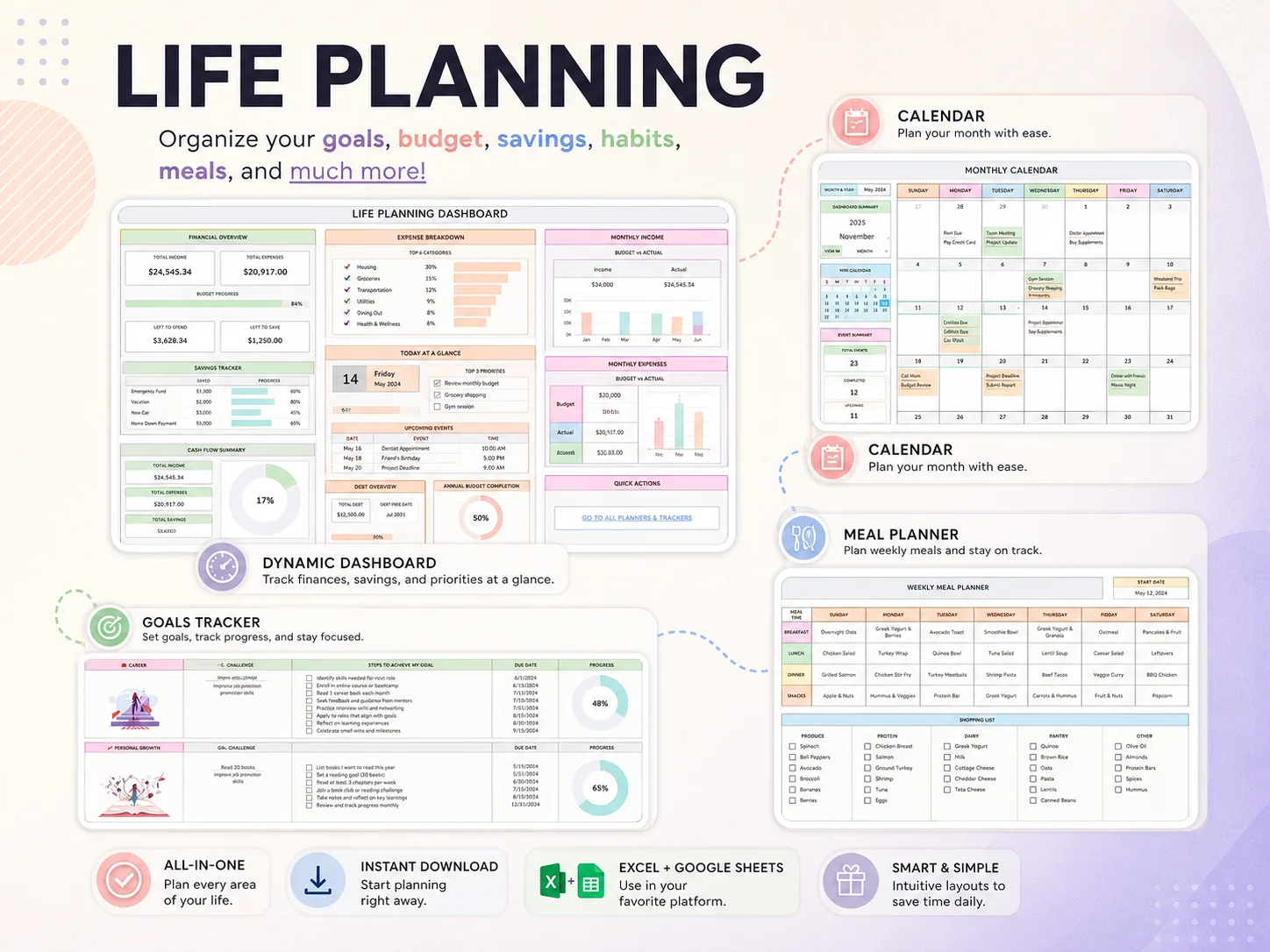
Sunday, about 20 minutes. Add this week's tasks to the weekly calendar. Put five dinners into the meal planner, then fill in the grocery list next to it, which has columns for produce, protein, dairy, pantry and other. Check the dashboard: money left to spend, today's meals, the tasks due.
One goal, cut small. Say the goal is $1,800 saved for a trip in 12 months. That is $150 a month, or about $35 a week. In the goal tracker it becomes a list of steps with checkboxes and due dates, here the 12 monthly deposits, next to a progress bar. After four of the twelve deposits you are one third of the way.
What Keeps a Life Planner in Use Past Month Three?
A life planner stays in use when it needs little upkeep. These three setup choices matter more than the format you pick.
Enter recurring things once. Bills, paychecks, subscriptions and chores repeat. If a planner makes you rewrite them every month, you will start skipping it.
Book a weekly review. Twenty minutes on the same day each week is enough to plan tasks, meals and the next goal step. Treat it as an appointment with a set time and place, the kind of when-and-where plan the research above describes.
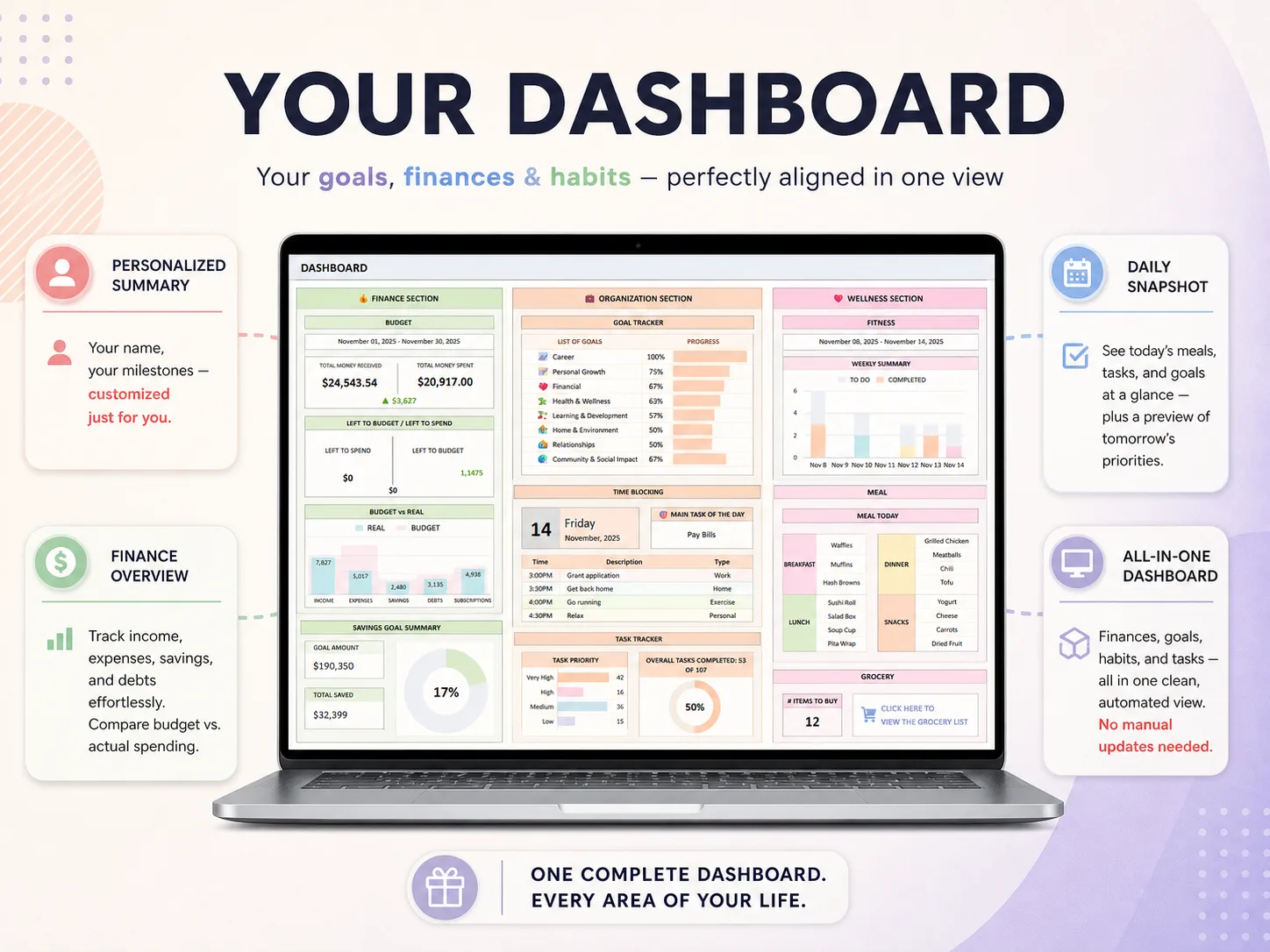
Make the dashboard the first thing you see. If you open one view each morning, it should show today's tasks, meals and what is left in the budget. A spreadsheet life planner with a ready-made dashboard saves you building that view yourself.
Why Trust This Article
We are the Cosmo Suite team that builds and sells the Ultimate Life Organizer, so we have a stake in this topic. Where paper, apps or Notion fit better, we say so.
Methodology: every price was read on the vendor's own page on 4 October 2026, using the yearly plan where one exists; prices change, so check before you buy. The worked week is an illustrative example with sample data, not a customer's.
Read more about us and how we write in our editorial policy, or contact us through the site footer if you spot a price that has changed.
Where the Ultimate Life Organizer Fits
The Ultimate Life Organizer, sold by Cosmo Suite at ultimatelifeplanner.site, is that one-place setup already built, for Excel and Google Sheets.
It is 4 spreadsheets with 70+ tabs: a Budget Planner, an Annual Habit Tracker (14 tabs), a Life Planner and a Task Tracker. The all-in-one dashboard has finance, organization and wellness sections. There are monthly and weekly calendars that fill themselves in, a goal tracker with progress bars, time blocking, and recurring automations for income, bills, debts and subscriptions. You also get 12 monthly habit trackers with a yearly summary, fitness, weight and hydration trackers (metric or imperial), a weekly meal planner with a grocery list, and a task dashboard with recurring and one-time task logs.
It costs $9 once, works every year without a subscription, and comes with a step-by-step YouTube tutorial. It has no app, push reminders or bank sync, so if those matter most, keep an app for that job.
If you want one place, the Excel and Google Sheets life planner bundle has screenshots of the tabs before you buy.
Frequently asked questions
Which life planner is best for me?
It depends on where your life admin happens. If you think with a pen, choose paper. If you need phone reminders or a shared family calendar, keep those apps. If it is spread over four or five places, a spreadsheet life planner gives you one place to update.
How much does a life planner cost?
Anywhere from nothing to about $250 a year. On 4 October 2026 an Erin Condren LifePlanner started at $32.50 for a dated 12-month planner, while a Passion Planner Daily cost $36 a book and a year of daily pages takes four books ($144). An example stack of four paid apps (budget, tasks, meals, habits) came to about $248 a year. A spreadsheet you build yourself is free; the Ultimate Life Organizer is $9 once.
Can I use a paper planner and a digital one at the same time?
Yes, as long as each has one job. A common split is paper for the daily to-do list and a spreadsheet for money, meals and yearly goals. Trouble starts when the same item lives in both, because one copy soon falls behind.
How long does it take to set up a life planner?
Plan on one evening for the first setup and about 20 minutes a week after that. The first sitting covers things you enter once: recurring bills, income, a few habits and one or two goals. The weekly session covers tasks, dinners and the grocery list for the next seven days.
What is the difference between a life planner and a regular planner?
A regular planner is mostly a calendar: days, appointments and a to-do list. A life planner adds the rest of running a life, such as a budget, habits, meals, health logs and long-term goals, in one place.
What is the fastest way to start a life planner?
Start from a file that already has the tabs and the dashboard built. In the Ultimate Life Organizer you enter recurring bills and income once with their frequency, add this week's tasks and meals, and set one goal with its steps. The auto-fill calendars and the goal tracker's progress bars take it from there.
Sources
- U.S. Bureau of Labor Statistics: American Time Use Survey, 2025 results
- U.S. Bureau of Labor Statistics: ATUS Table 1, time spent in primary activities
- Gollwitzer and Sheeran (2006): Implementation intentions and goal achievement, a meta-analysis
- Erin Condren: LifePlanner
- Erin Condren: Softbound LifePlanner (dated planners cover 12 months)
- Passion Planner: Daily Planner, Undated (93 daily layouts; four books for a year)
- Notion: Pricing (Free plan)
- YNAB: Pricing
- Todoist Help: Todoist Pro pricing update
- Plan to Eat
- Habitify: Pricing
- Google Workspace: FAQ (free consumer apps)