Family Command Center: A Shared Calendar, Chore List, and Meal Plan
family command center: build one visible place for your family calendar, chores, and meals. Compare a wall board, shared app, and spreadsheet setup.
By Ultimate Life Organizer by Cosmo Suite · Editorial policy
Published · 10 min read
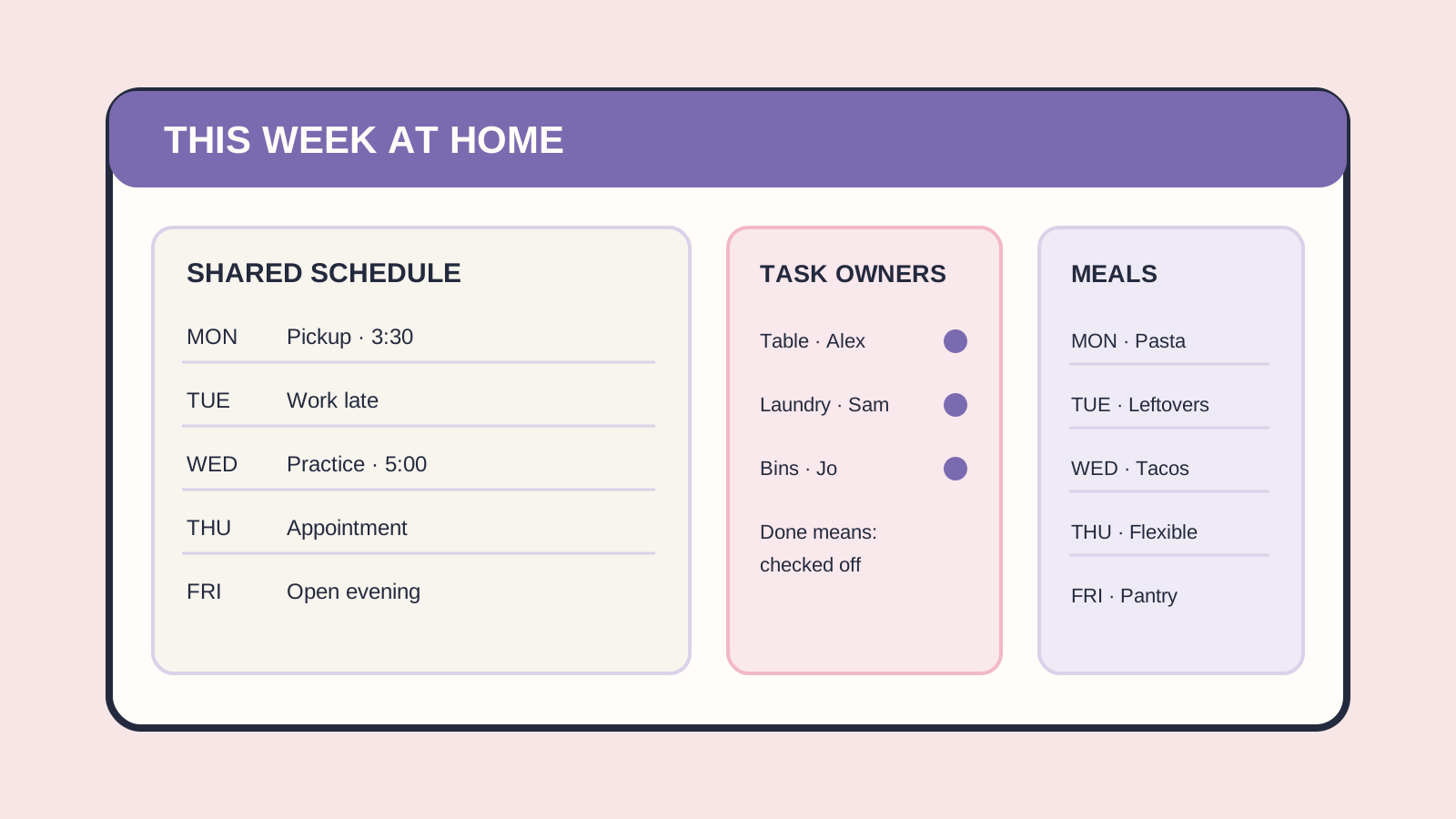
When the family calendar is on one phone, dinner lives in a text thread, and chores stay in someone's head, a command center can make the week's plan visible. Keep it simple enough that people can check and update it without asking one person to translate the plan.
A family command center is a shared place to check the household schedule, current jobs, and meal plan. It needs clear owners for recurring work and a way to add new information. This guide compares a wall board, a digital display or app, and a spreadsheet setup, including what each cannot do.
Key takeaways
- Keep the weekly calendar, task owners, and meals together.
- Use one place as the source of truth; treat other views as copies.
- A command center does not share work by itself. Each recurring job needs an owner and a clear finish point.
Family command center at a glance
The best setup depends on where your family sees changes and who needs to update them. A paper board is easy to notice at home. A shared digital calendar travels with its users. A spreadsheet can hold a broader plan, but it does not provide family notifications or automatic calendar sync.
| Setup | Schedule | Tasks and chores | Meals | Best for |
|---|---|---|---|---|
| Wall calendar or whiteboard | Visible at home; changes are written by hand | Add names and a simple done mark | A short weekly menu fits beside it | Families who pass the same spot daily |
| Shared calendar or family app | Updates can reach members on their devices, depending on the tool | Assignments and reminders depend on the app | Some tools include meal and grocery views | Households that need changes away from home |
| Spreadsheet or shared document | Can hold a weekly overview; sharing and live updates depend on the file settings | Useful for lists with owners and due dates | A menu and grocery list can sit together | People who want a flexible plan and do not need alerts |
| Hybrid | One digital calendar plus a printed weekly view | Put this week's owners on the visible board | Keep only this week's menu in view | Households that want mobile updates and a glanceable kitchen view |
Choose one source of truth before adding more screens. Otherwise, a changed pickup time may be correct in one place and wrong in two others.
What belongs in a family command center?
A practical command center puts only the household's next decisions in view: where people need to be, what must get done, and what is planned for meals. Keep long-term records and private information outside the public display.
Start with three panels:
- This week's schedule: appointments, pickups, activities, and any handoff that changes who is available. Include the time and the person responsible for transport when that matters.
- Jobs with owners: write the task, who owns it, and what “done” means. “Kitchen” is vague. “Clear the table and load the dishwasher after dinner” is checkable.
- Meals and groceries: list the planned dinners, then add only the missing ingredients to the shopping list. Mark a night as leftovers or flexible if that is the real plan.
This is enough to answer common questions without turning the wall into a filing cabinet. Add a school notice holder or a contact list only if someone checks it. Keep passwords, medical details, and private schedules off a public board. If you use Google Calendar, its sharing permissions let you choose who can see event details or make changes; check the settings for the account you use.
How do you build one that people will use?
Build the command center around the moment people need it. A schedule that is visible at the door helps with departures; a meal list near the kitchen helps at dinner. The first version can be a sheet of paper. Test the routine before buying a device.
1. Pick a visible home
Choose a place people already pass, such as the kitchen, entryway, or a shared workspace. Put it at a height everyone who needs it can read. If some family members are rarely home, make sure the same plan is available on a device they use.
2. Agree on where updates go
Choose the calendar or list where a new event is entered first. Decide who can add or change items, and how everyone knows a change is final. If you keep a paper view beside a digital calendar, name which one wins when they differ.
3. Assign work, not reminders
For a recurring task, write one owner and a visible finish condition. “Take out recycling when the bin is full” is clearer than a chore chart that just says “recycling.” Rotate owners if that fits the household. Do not use the board to track a task without agreeing who is responsible.
4. Keep the first weekly review short
Set aside one regular time to check the next seven days. Confirm appointments, assign jobs that have no owner, and choose meals around the evenings people are home. Move finished items off the active view so the current week stays readable.
5. Remove sections nobody checks
After a week or two, remove the panel that people skip. Add a section only when the same question or missed handoff keeps returning. More information can make the important information harder to find.
What does a one-week setup look like?
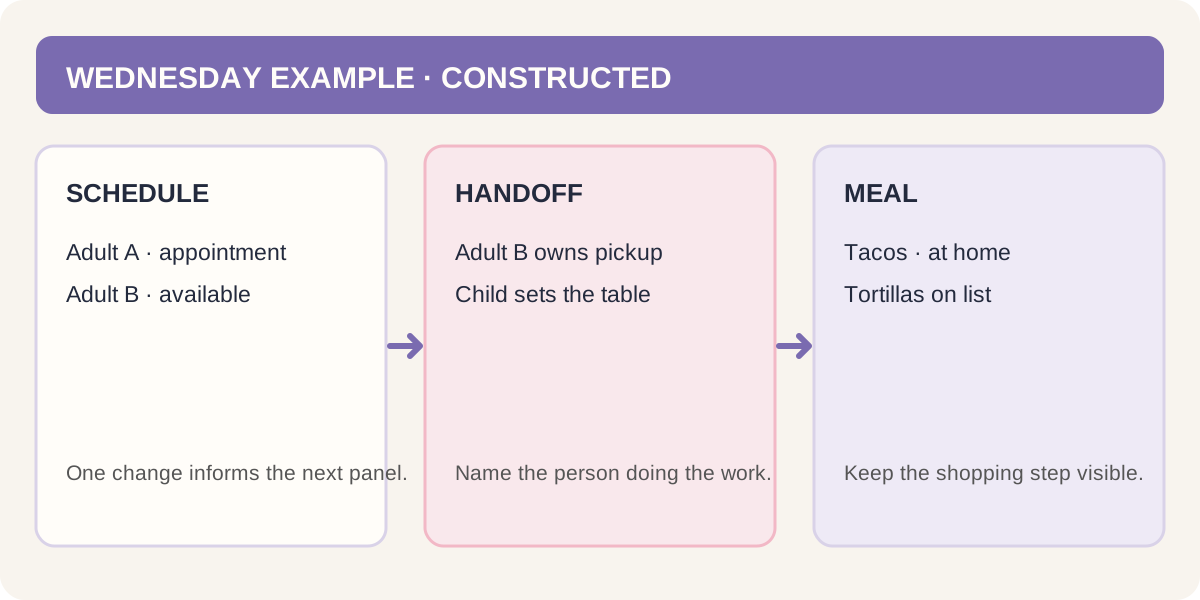
A small example shows how the three panels connect. This is a constructed illustration, not a record from a household: imagine two adults and one school-age child planning a week with a late work meeting, one activity, and three dinners at home.
| Day | Schedule | Owner or handoff | Meal plan |
|---|---|---|---|
| Monday | Child's activity after school | Adult A handles pickup | Pasta; add sauce to grocery list |
| Tuesday | Adult B works late | Adult A checks the meal plan | Leftovers |
| Wednesday | No shared appointment | Child sets the table | Tacos; buy tortillas |
| Thursday | Adult A has an appointment | Adult B handles dinner | Flexible meal |
| Friday | Confirm weekend plans | Both check the calendar | Takeout or pantry meal |
The point is not the sample family's exact schedule. It is the handoff: one calendar entry changes who is available; that affects the dinner plan; the task list says who is doing the next job. If those details sit in unrelated places, the person coordinating has to carry the connections in their head.
Use the same pattern for your own week. Start with the calendar, then list the jobs that change because of it. Finish with meals and the missing grocery items. If a section does not change what anyone does, it can stay out of the command center.
Wall board, digital display, or spreadsheet?
Pick the format that matches how your household updates plans. A wall board offers a shared glance without requiring a login. A digital system is better for remote changes and alerts when the product supports them. A spreadsheet suits a person who wants a customizable overview and is willing to maintain it.
Choose a wall board if people gather in one place and like writing updates by hand. It is inexpensive to start with supplies you already own. Its weakness is duplication: when plans change outside the home, somebody must copy the change onto the board.
Choose a shared calendar or family app if members need changes while they are away. For example, Mango Display's current feature page describes a screen with calendar, chores, and meal planning, while Family Wall Planner describes a tablet display and phone app. These are examples of product claims, not independent comparisons. Check whether a candidate supports the devices and calendars your household uses, and which features its current plan includes. Do not assume every product syncs with every calendar.
Choose a spreadsheet if one person wants a flexible weekly view, list, or meal plan and can keep it current. It can group information, but it is not automatically a shared family display. Check the file's sharing settings and decide who maintains it.
Choose a hybrid when you need both a source that updates on the go and a view everyone can see at home. Keep the wall version short: this week's schedule, task owners, and meals. Link or refer to the full calendar rather than copying every detail.
Microsoft Research's 2006 LINC study examined a kitchen calendar designed around household coordination. A separate 2005 survey of 621 employees at a technology company found that 51% primarily used their digital calendar at work to manage household events. That is historical, company-specific data, not a current population estimate. Both studies point to a practical design question: can the people involved see changes where they already plan? (LINC study; 2005 scheduling survey)
What makes a command center fail?
A command center stops helping when it becomes another person's private project. A neat board can show every appointment and still leave one person responsible for remembering, updating, and assigning all of it.
Use a one-week check to find the weak point: when a plan changes, can everyone who needs to know see the update; does every recurring job have an owner; and can the person planning dinner find the meal and shopping list? Fix the first “no” before adding another panel or buying a new display.
Watch for these signs:
- The same event appears in several places. Pick one source of truth and stop copying details that do not need to be duplicated.
- Tasks have no owner. Add a person and a definition of done, or remove the task from the shared list until someone accepts it.
- The display is too crowded. Keep this week visible and move reference information elsewhere.
- The digital view is not actually shared. Check account access and notification settings with the people who need them.
- The board exposes private details. Move sensitive information to a private account or file.
The goal is shared access and clear handoffs. A tool can make work visible; the people using it still need to decide how to divide that work.
Where the Ultimate Life Organizer fits
The Ultimate Life Organizer by Cosmo Suite is a set of four spreadsheets with 70+ tabs for budget, habits, life planning, and tasks, in Excel and Google Sheets. It includes monthly and weekly calendars, a meal planner with grocery list, and task logs. It is a personal planning file, not a shared family calendar app.
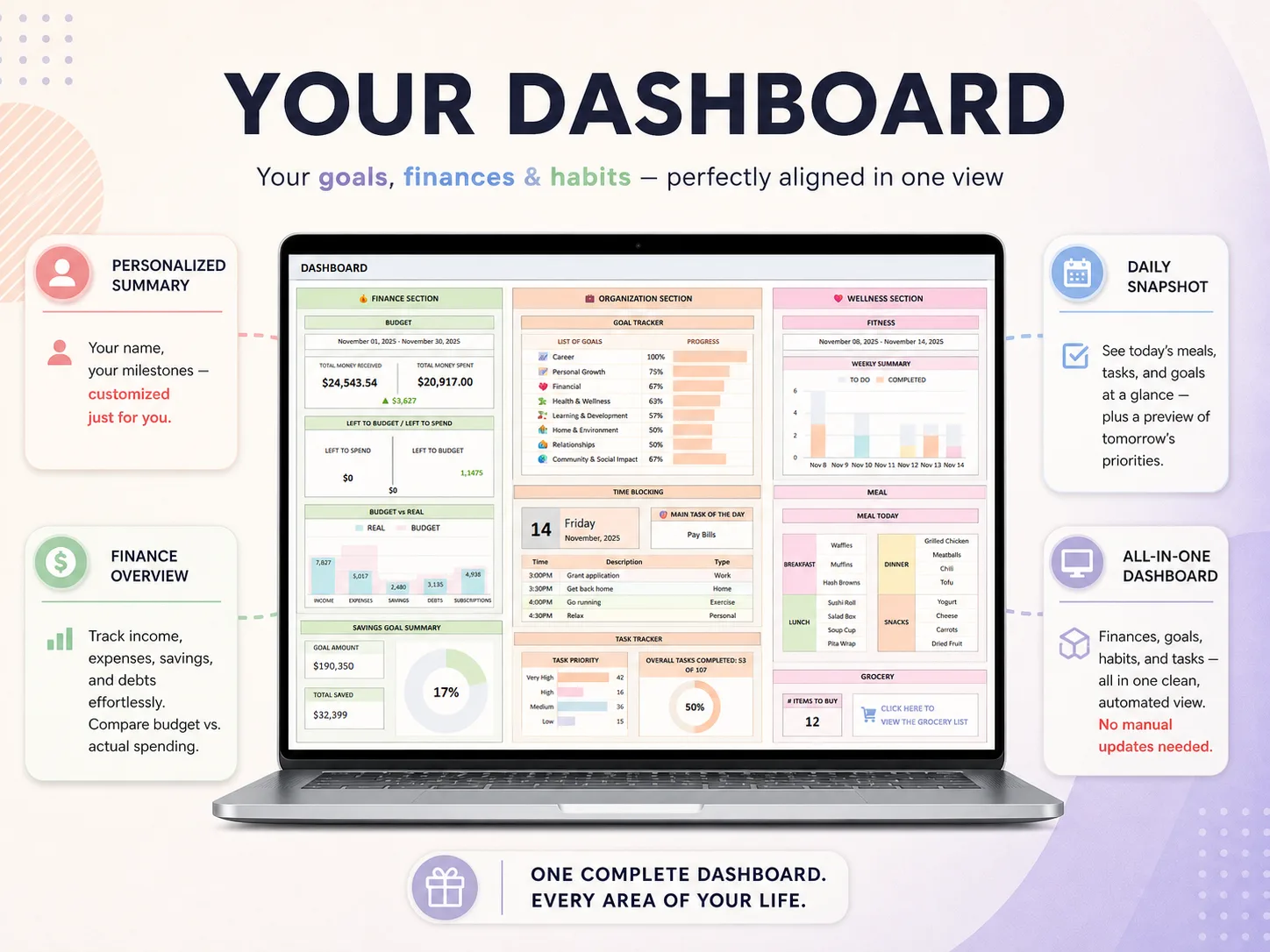
The screenshots here show the actual downloadable workbook: its dashboard has finance, organization, and wellness sections, and its life-planner file has a weekly meal planner with a linked grocery list. These are personal planning tools, not shared family access or live sync.
If you want one place for your own household planning, the Ultimate Life Organizer overview shows the included spreadsheets. You can use its weekly calendar and meal plan to organize your own plan, then share a separate short version with the household if that suits your setup. The file does not include family member accounts, automatic sync, reminders, or a wall display. See what is included in the Ultimate Life Organizer before deciding whether a personal spreadsheet fits your part of the plan.
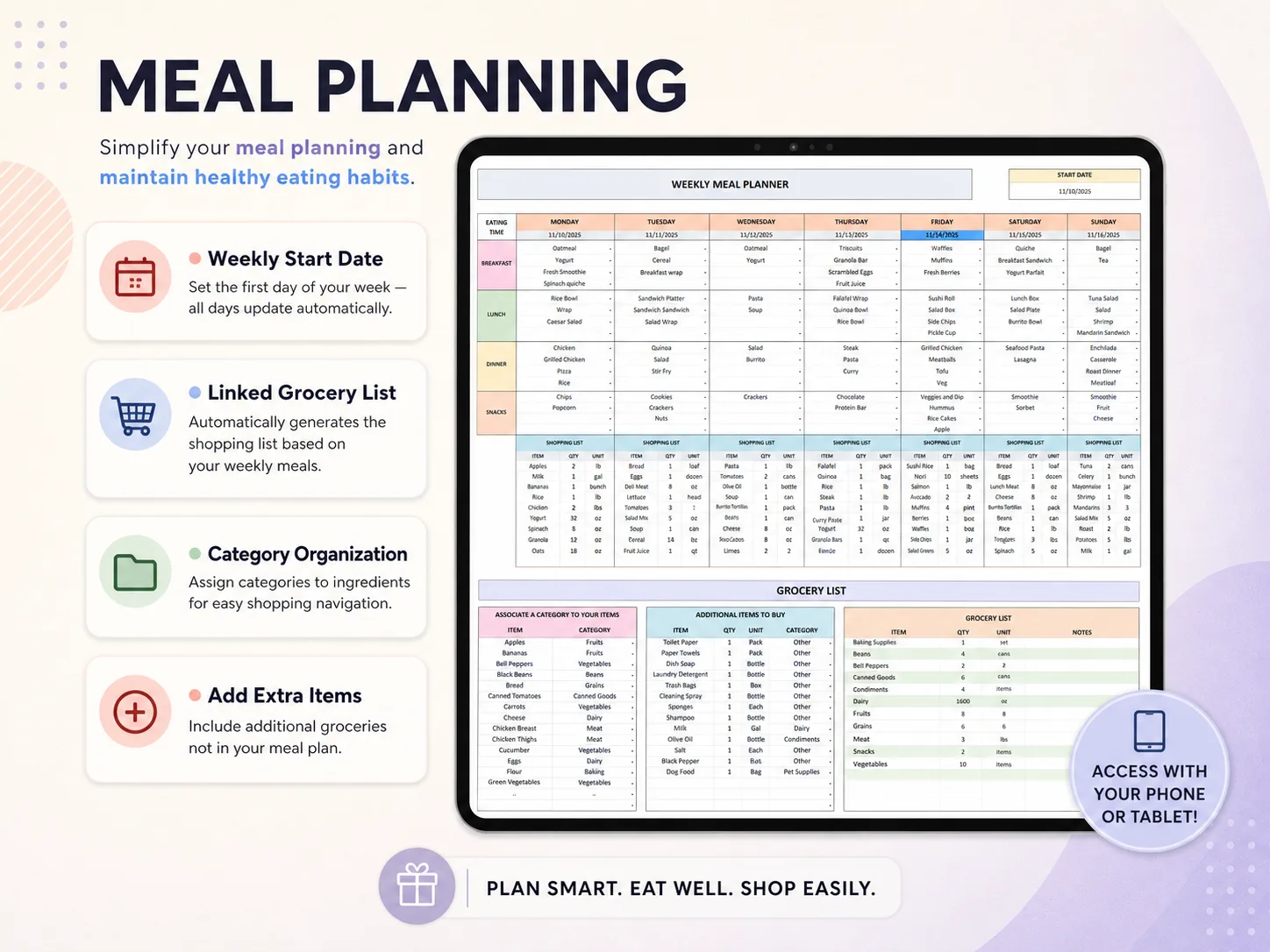
The organizer also includes a weekly meal planner and grocery list. That can help one person prepare their own week, but a family still needs to agree where the shared version lives.
For a broader comparison of formats, read how to choose a life planner or compare life planner options by format.
Why Trust This Article
Cosmo Suite sells the Ultimate Life Organizer described above. The Cosmo Suite team prepared this guide and checked the linked research and product pages on 15 October 2026. The household example is constructed, not a customer story. Vendor feature descriptions are identified as vendor claims. Read About Cosmo Suite and the editorial policy for how we make and correct product content. Check current app features and sharing settings before relying on them.
Frequently asked questions
What is a family command center?
A family command center is one place to check the household schedule, tasks, and meals. It can be physical or digital. Keep it focused on near-term decisions and give each recurring task a clear owner. It does not need to include every document or detail the household keeps.
Where should I put a family command center?
Put it where people naturally check plans, such as near the kitchen or entryway. If a family member needs updates away from home, choose a digital view they can access too. Keep private information out of any display that guests or children can see.
What should go on a family command center?
Start with the next week's schedule, task owners, and meal plan. Add a grocery list if it is used during shopping. Add a paper holder or contacts only when those items solve a repeat problem. Remove anything that people do not use.
Can I make a family command center for free?
Yes. Use a paper calendar or a whiteboard you already have, or use free calendar and document tools. Free setups still take time to update. Before paying for a display or app, check whether the features your family needs are included in the listed price.
Is a digital or wall family command center better?
Neither is best for every household. A wall view is easy to glance at when everyone is home. A digital calendar can carry updates to people away from home if it supports the right accounts and devices. A hybrid can work when both needs matter, as long as you avoid conflicting copies.
How do I get my family to use a command center?
Place it where people already make plans, keep it short, and give everyone a clear way to add or check information. Review the next week together and assign recurring jobs by name. If only one person does all the updates, revisit the ownership rules as well as the layout.
Frequently asked questions
What is a family command center?
A family command center is a shared place to check the household schedule, current jobs, and meal plan. It can be a paper wall board, a display, or a set of shared files. Its job is to make the next action easy to see, not to store every detail about the family.
Where should I put a family command center?
Put it where household decisions already happen, such as near the kitchen or the place where bags and keys are collected. Keep the most-used information visible at a glance. Store private details, account information, and long notes somewhere less public.
What should go on a family command center?
Start with this week's appointments, who is responsible for each household task, and the meal plan. Add a short capture spot for new items. Add school notices or household contacts only if people use them there; a board full of reference material is harder to scan.
Can I make a family command center for free?
Yes. A paper calendar, a whiteboard, or a shared calendar and document can cost nothing if you already own the supplies and accounts. The tradeoff is setup and upkeep. A dedicated screen or app may add features, but check its hardware and subscription costs before choosing it.
Is a digital or wall family command center better?
It depends on how your household shares updates. A wall board is easy to see and edit at home, but someone must copy changes onto it. A shared digital calendar can update away from home, but it only helps if everyone can access and checks it. Some households use both, with one source of truth.
How do I get my family to use a command center?
Give each person a clear reason to check it and a small part to maintain. Agree on where new events go, who owns recurring jobs, and when the plan gets reviewed. If only one person updates the system, it may display the household's work without sharing it.
