How to Get Your Life Together in One Weekend
how to get your life together: gather loose ends over one weekend, sort what's urgent, and make a short plan for next week. Use this reset to start.
By Ultimate Life Organizer by Cosmo Suite · Editorial policy
Published · 9 min read
When tasks, appointments, bills, meals, and personal plans sit in different places, it can be hard to tell what needs attention first. A weekend reset can put the loose ends in one view and give the coming week a little shape.
To get your life together this weekend, gather the open loops, sort them by real deadline and repetition, then schedule only the next steps that matter this week. The goal is a usable plan by Sunday evening; long-running problems may need more time.
This reset is for ordinary life admin: dates to check, tasks to place, and a few choices to make. If something urgent involves safety, health, legal matters, or money you cannot cover, contact a qualified person or service. A planner can help you track a next step, but it cannot resolve a crisis.
Key takeaways
- Gather open loops in one temporary place before sorting them.
- Confirm dates, then choose the next action for items that matter this week.
- End with a short weekly view and a clear list of what can wait.
Get your life together this weekend at a glance
A weekend reset is a short life-admin review that ends with a clear view of the next week. A useful order is capture, sort, schedule, then stop. Give each work block one area, such as bills, home needs, the calendar, or a personal priority. Adjust the order to fit your weekend; the blocks are suggestions, not a research-backed time prescription.
| When | Area | What to do | Leave with | Best for |
|---|---|---|---|---|
| Friday, before you start | Setup | Pick one place to collect loose ends | A note, page, or paper list | Stopping the search for the “right” planner |
| Saturday, first block | Bills and dates | Confirm due dates and choose the next action | A short list of time-sensitive items | Seeing what needs attention first |
| Saturday, second block | Home needs | Check groceries, errands, and one recurring task | A few household next steps | Making the coming week easier to run |
| Sunday, first block | Calendar | Add fixed commitments and the tasks around them | A readable next-week view | Starting Monday with fewer open questions |
| Sunday, second block | Personal priority | Choose one goal or task, then leave room to rest | One next step and a stopping point | Keeping the plan from taking the whole weekend |
Keep the stopping rule visible: the reset is done when you can see your fixed commitments, the next action for urgent items, and what you have chosen to defer. Skip any area with nothing to sort this week. If the list is long, that is still a useful result. You have turned a vague feeling into things you can review one at a time.
The dashboard shown here is from the actual Ultimate Life Organizer from ultimatelifeplanner.site. It gives one example of grouping a few planning areas in one file. You can use paper or tools you already have for the same weekend reset.
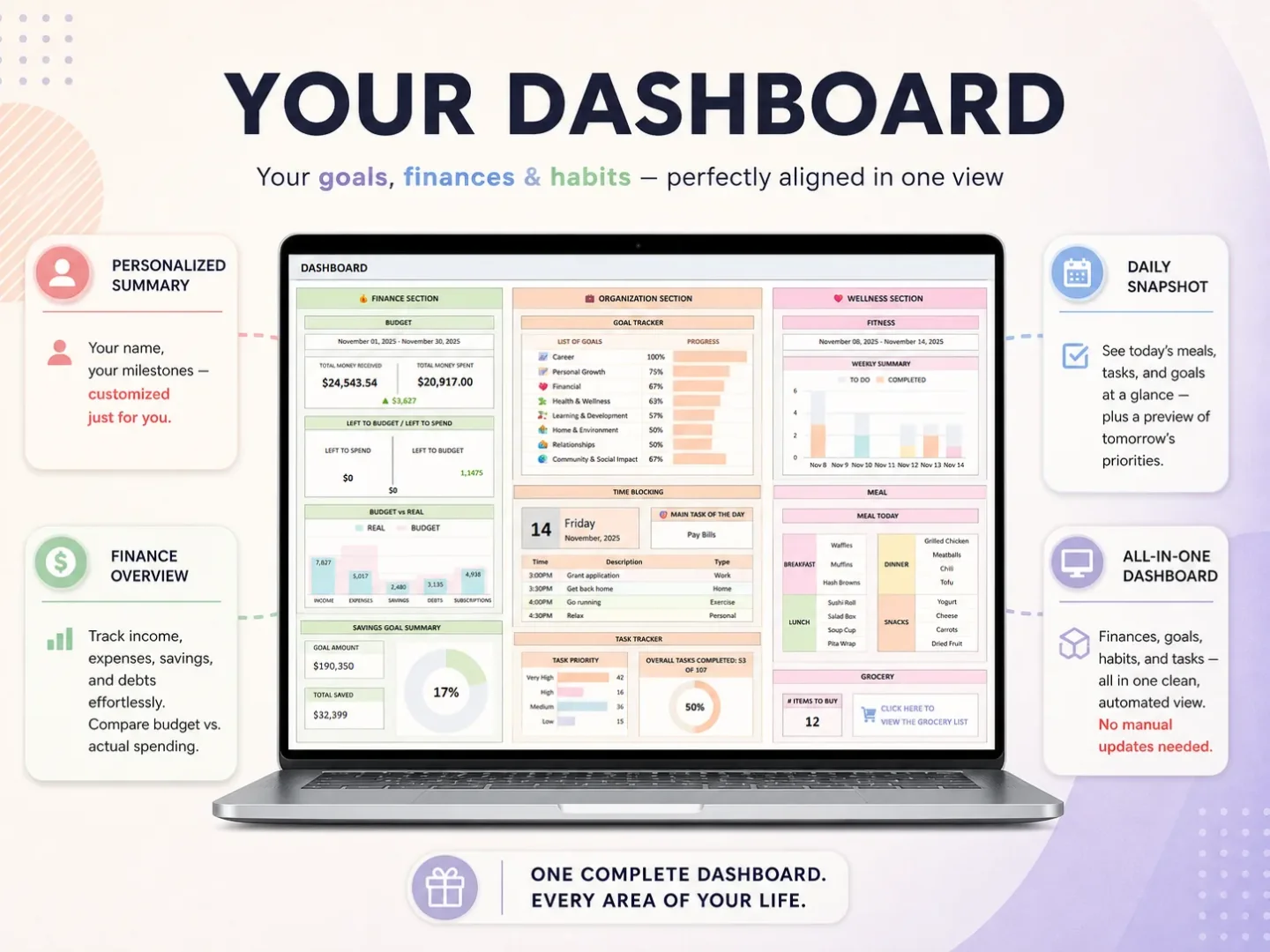
What should you gather first?
Gather the open loops into one temporary inbox before you start sorting them. Use a notebook, a blank page, or a note you already trust. First, see what is waiting. Leave system design for later.
Write down items from the places where you keep finding them: calendar entries, emails you flagged, papers by the door, a task app, a household message thread, and anything you keep reminding yourself to remember. Keep each item short. “Renew registration” is enough for the first pass. You can find the website or paperwork when you choose the next action.
Include a few different kinds of loose ends:
- Dates: appointments, due dates, renewals, and events that affect your availability.
- Tasks: something you need to do, send, book, return, or check.
- Household needs: groceries, laundry, supplies, or a handoff someone needs to know about.
- Decisions: a choice that is holding up another task, such as picking a day to call or deciding what to serve for dinner.
Do not put passwords, full account numbers, or private documents in a general planning list. Use a label such as “check the utility account” and keep the details in the account or secure file where they belong.
If you want a ready-made place to keep several personal planning areas together, the Ultimate Life Organizer's connected planning spreadsheets are one option. A notebook or a calendar you already use can serve as the temporary inbox too.
For bill dates, the Consumer Financial Protection Bureau's bill calendar is a public tool for listing what is due and when. Use it to record dates if that helps you see the month. This article does not recommend how to pay or prioritize bills.
How do you sort the pile without making another project?
Sort the list into three simple buckets: time-sensitive, repeated, and can-wait. This keeps a weekend reset from turning into a new filing project.
| Bucket | Put here | Next move |
|---|---|---|
| Time-sensitive | Something with a confirmed date or consequence | Write the date and the next action |
| Repeated | A task or decision that returns on a schedule | Note when it repeats and where to review it |
| Can-wait | A real item with no near deadline | Give it a review date or remove it if it no longer matters |
Here is a constructed example. Imagine your list includes a phone bill due Wednesday, groceries for two meals, a vehicle registration renewal you need to check, and a goal to make more time for exercise. The bill gets its confirmed date and a reminder to review the statement. The grocery item becomes a short list for the next shopping trip. The renewal goes in the time-sensitive bucket only after you confirm the date. The goal can wait until you decide what a realistic next step looks like.
The example is illustrative. A specific date gives you something clear to act on. “Registration” can sit in a list for weeks. “Check the renewal date on Saturday” gives you a next step without pretending you already know when it expires.
If an item repeats, add the repeat pattern only after you have confirmed it. Google Calendar's recurring event instructions explain how to set an event to repeat on selected days and when to end the series. A paper calendar or another tool can work too. Avoid making a repeating event for a task you only need once.
What should you do on Saturday?
On Saturday, give bills and dates one block, then use a separate block for home needs. This keeps the reset focused while you handle the next action attached to a real deadline. You do not need to clear every drawer or fix every habit to make the coming week easier.
Start with bills and deadlines. Confirm dates rather than guessing. If an item needs a call, document, or online form, write down that first step. If it cannot happen this weekend, record the next time you can act on it. That small distinction keeps “do paperwork” from becoming a permanent item with no clear beginning.
Use the second block for home needs. Perhaps you keep forgetting what groceries are missing, or you have to search several places to find an appointment. Pick one small adjustment for the next week: list the groceries together, move the confirmed appointment to the calendar you already check, or put a paper note beside the item you need to return.
Do not make a weekend project out of the whole house. Choose a small area only when clearing it removes a real obstacle, such as being unable to find the documents for a task due soon. If a task has no immediate effect on the next week, you can decide to defer it.
The choice can be a notebook, calendar, or file you already use. The useful part is being able to find the current list when you need it.
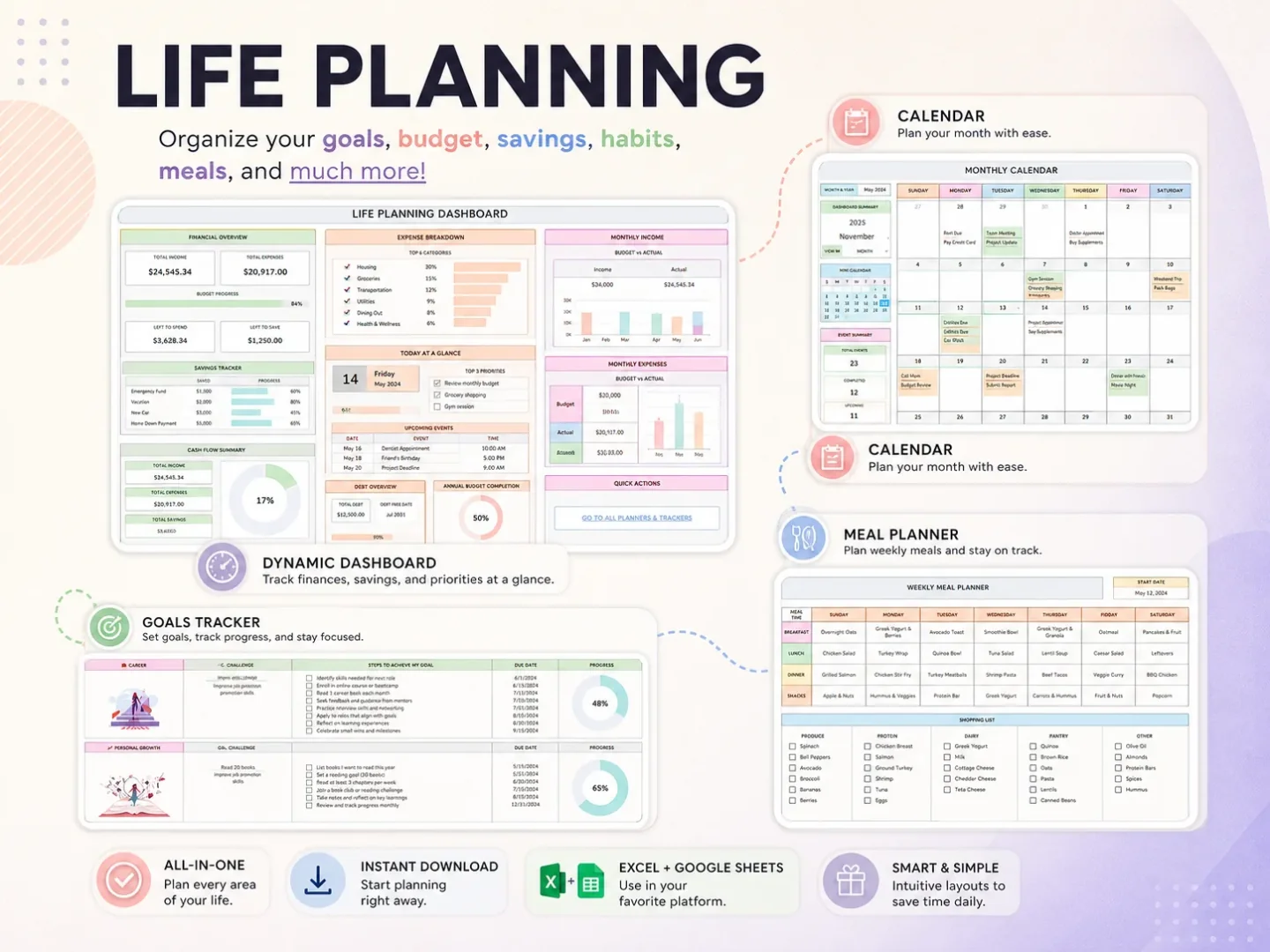
This is a real view from the workbook's life-planning spreadsheet. It can help you see your own tasks and plans together. It does not share them with other people automatically.
How do you plan Sunday without filling every hour?
On Sunday, put the week's calendar in one block and a personal priority in another. Place fixed commitments first, then choose a few tasks that fit around them. Leave open space for travel, interruptions, rest, and work that takes longer than expected.
In the calendar block:
- Add confirmed appointments and deadlines to the calendar you check.
- Choose up to three important tasks for the week. Use fewer if the week is already full.
- Add household needs, such as groceries or a meal plan, only if they make the week easier to manage.
- Leave at least one flexible block. Use it for anything that moves or takes longer than planned.
- Decide what can wait until the next review.
In the personal-priority block, choose one goal or task that matters to you this week. Write a next action small enough to place on a real day. If the week already looks full, let that be the whole block: keep the goal visible and pick it up at the next review.
Treat “up to three” as a practical cap for this example, not a fixed rule. If you have several urgent obligations, list those first and ask someone for help with the load where possible. If the week is quiet, you can choose more.
A meal plan can be very small. Two meals and a flexible night may be enough to make a shopping list. A task list can be short too: use a verb, add a date only when there is a real date, and name who owns it if someone else is involved. Let the plan guide your next actions instead of assigning every hour.
Before you finish, look at Monday. Is there one item you need to prepare, bring, or confirm before the day begins? Put that action where you will see it. Then stop editing. You can adjust the plan when new information arrives.
What if your plan falls apart by Tuesday?
If the plan falls apart, reopen the current list and sort it again. Keep the commitments that still matter, move only active tasks to a date you can meet, and remove items that no longer need attention.
Maybe a task took longer than you expected, another obligation took its place, or the task was not as important as it seemed on Sunday. Use that information when you make the next plan; you do not need to restart the entire system.
Try a short check-in:
- What is still due this week?
- What is the next action for each item?
- Which task can move without causing a problem?
- Is there something I can drop or ask another person to handle?
If you keep a list in one file, give unfinished items a new date only when you have chosen one. Otherwise, leave them in a review bucket so they do not silently fill tomorrow. For a broader look at the formats people use to plan their lives, read how to choose a life planner that fits your routine.
If you want those active tasks and dates in one workbook, the Ultimate Life Organizer planning files are an option. A notebook or calendar you already check works too.
Where the Ultimate Life Organizer Fits
The Ultimate Life Organizer by Cosmo Suite is a $9 one-time bundle of four spreadsheets with more than 70 tabs, provided for Excel and Google Sheets. The files cover budgeting, habits, life planning, and tasks. The bundle is reusable each year and includes a step-by-step YouTube tutorial.
Its dashboard, calendar, task tracker, meal planner, and goal tracker can put several parts of personal planning in one place. The workbook is not a mobile app. It does not send reminders or notifications, sync bank accounts, or connect live to your device calendar. Those limits matter if you rely on alerts or need a shared schedule that updates for several people.
The product may fit if you already use Excel or Sheets and want a ready-made set of planning files. It may not fit if you want automatic calendar sync, phone reminders, or a family app. See the Ultimate Life Organizer overview for the full contents list, then compare life planner formats and what goes into a Google Sheets planner template before choosing.
Why Trust This Article
Cosmo Suite sells the Ultimate Life Organizer described here. The product details were checked against its contents list on 16 October 2026. The example is constructed, and the weekend sequence is an editorial framework, not a study result or a promise. The CFPB and Google links were checked on 16 October 2026; see their pages for current guidance and tool details.
Frequently asked questions
How do I get my life together when everything feels overdue?
Start with due dates and consequences you can confirm. Choose the next action with the nearest real deadline, then set a date for what can wait. For an urgent safety, health, legal, or financial problem, contact a qualified service or professional.
Can I get my life together in one weekend?
Use a weekend to make the next week easier to see. Gather open tasks, confirm deadlines, and choose a few next steps. Long-running problems may need more time, support, or a specialist.
What is the first thing to do when life feels unorganized?
Collect your open loops in one temporary place before changing apps or planners. Include appointments, tasks, household needs, and decisions. Then sort by deadline and choose what needs action first.
How do I organize bills and tasks together?
Keep the bill name, due date, and next action where you can review them with your week. The Consumer Financial Protection Bureau offers a bill calendar for recording due dates. This is an organizing step, not financial advice.
What if I fall behind again after my weekend reset?
Open the current plan. Keep obligations that still matter, reschedule active tasks, remove stale items, and choose one next step. You can pick up where you left off.
Do I need a planner app to stay organized?
Paper, calendars, spreadsheets, and apps can all hold a plan. Pick an app if you need mobile capture, sharing, or reminders. A spreadsheet can show related information together, but it will not send notifications or sync a calendar unless another tool provides that.
